



Hello everyone!
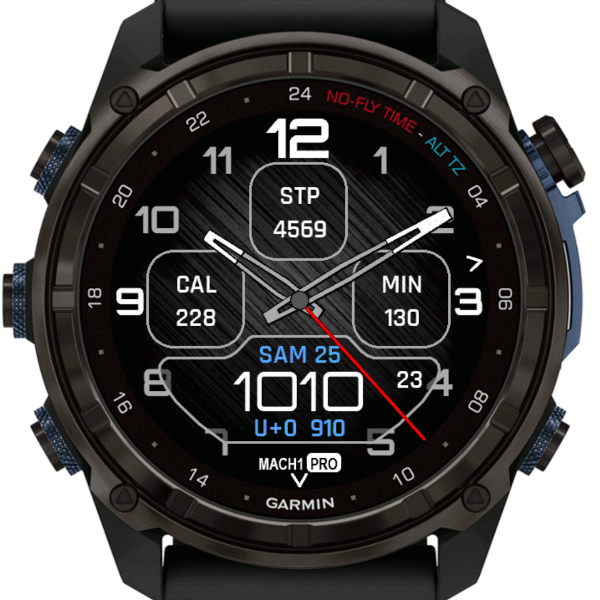
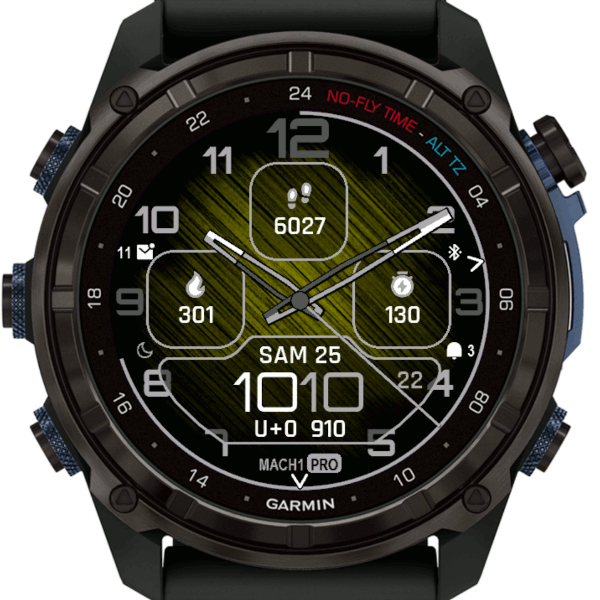
Today, I’m thrilled to unveil my latest app: a replica of the stunning Garmin D2 Mach 1 Pro aviator watch face. This watch face is a perfect blend of classic aviation style and modern technology, designed specifically for Garmin sports watches.
What makes this watch face unique? First, its design: a seamless fusion of analog and digital elements, offering both timeless elegance and contemporary functionality. The classic analog hands gracefully indicate the time, while the digital display provides essential information at a glance.
But that’s not all. One of the most exciting features of this watch face is the tinting of the background pattern, a feature now supported on recent Garmin devices. This subtle yet impactful detail enhances readability and adds a touch of personalization to your watch.
As always, my focus is on delivering the latest and greatest features while ensuring top-notch performance and reliability. This watch face includes all the functionalities you’ve come to expect from my apps, along with some special tweaks to make your Garmin watch truly stand out.
Whether you’re an avid aviator, an aviation enthusiast, or simply someone who appreciates a watch face with a distinctive style, this app is for you. It’s my tribute to the world of aviation and a nod to the iconic Garmin D2 Mach 1 Pro.
Thank you for your continued support. Your feedback and suggestions inspire me to keep innovating and creating apps that enhance your Garmin watch experience. I can’t wait for you to try this new watch face and hear what you think!
Fly high and stay stylish,
Manuel
4 responses to “Introducing My Latest Creation: The Aviator’s Dream Watch Face!”
The appearance is fantastic – the best I’ve seen to date.
When are having same for the Fenix 7X Pro ?
Love your work Manuel. You have added so much to Garmin watch collection, truly invaluable!
How do I tweak the settings to get the watch face color scheme I see in the picture, with red hour/minute numbers, white digital time, and blue background tint? I tried different pre-loaded color schemes and could not get this to come-up.
Thank You,
Steve
Thank you very much Steve!
This screenshot was created with a custom color setting
Minute Line Color = Red
Data Color2 = Yellow
Pattern Color = Blue
Foreground Color = White
Data Color3 = White
Thanks, I got it. It looks absolutely awesome on my Epix Pro Gen 2 Saffire edition. My watch is full of your watch faces. Thanks again for your great work!!